Free on the App Store

Progressive Overload Tracker for the Gym

Progressive overload is adding a little to an exercise over time: more weight, more reps or more sets. Aveldo tracks it from the sets you log, shows you last time's numbers while you lift, compares each workout with the last one, and with Aveldo Pro raises the weight for you when you have earned it.

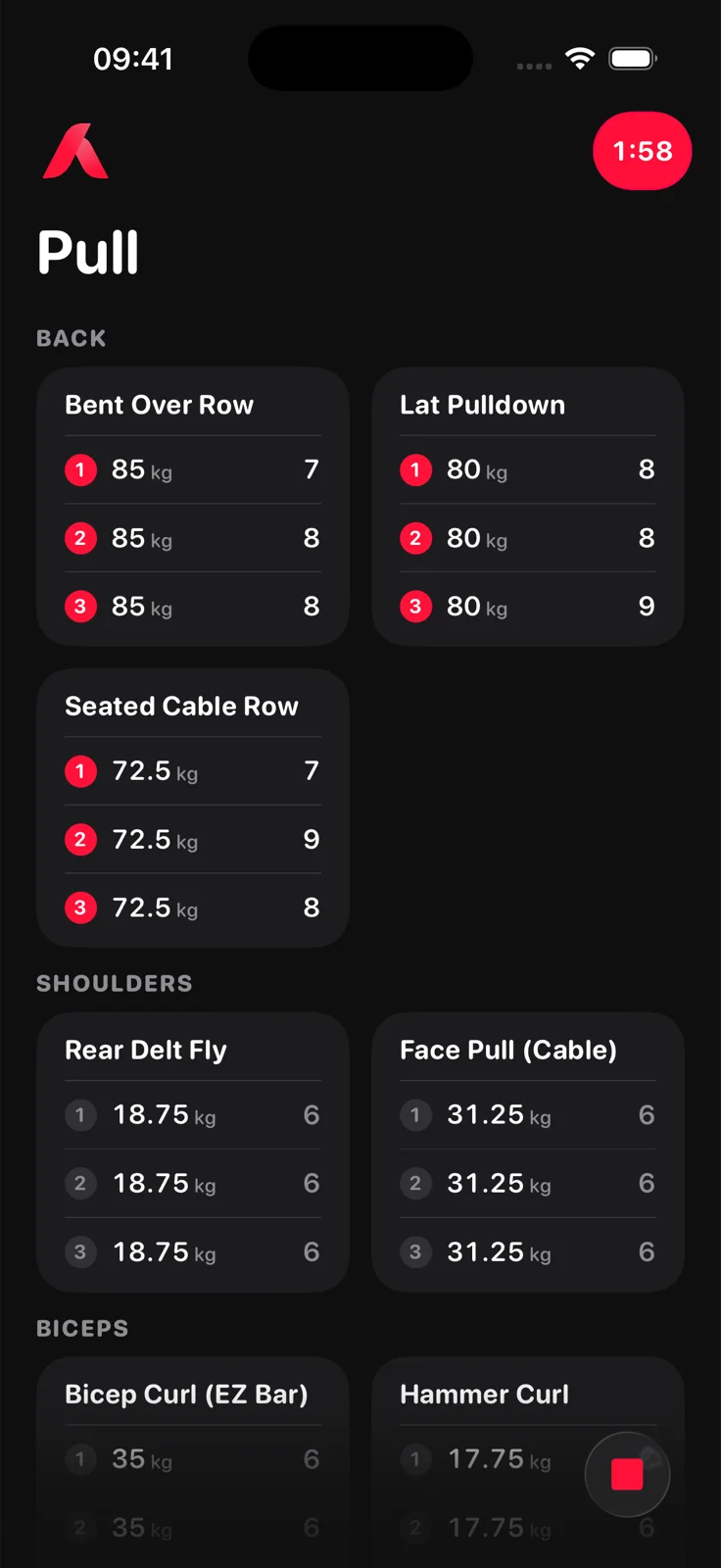
Aveldo workout screen in gym mode: a Pull routine with Bent Over Row, Lat Pulldown, Seated Cable Row, Rear Delt Fly and Face Pull tiles, each set line showing weight in kilograms and reps, and the rest timer counting down in the corner

What is progressive overload?

Progressive overload is the principle of gradually increasing the demand on a muscle so it keeps adapting. In the gym that means, for a given exercise, lifting more weight, doing more reps at the same weight, or doing more sets over weeks and months.

Without a log it is hard to know whether you are actually overloading or repeating the same session with a different feeling. The log is what makes the principle checkable.

How do you track progressive overload?

Record every set with its weight and reps, compare each session with the previous one of the same exercise, and look at the trend over weeks rather than day to day. A tracker should show last session's numbers while you lift and estimate strength from weight and reps together, so a rep gained at the same weight counts as progress.

In Aveldo

How Aveldo tracks progressive overload

Six things, from the set line to the trend, each built on the sets you log.

  1. Last session on every set lineEach line shows the weight and reps you did last time for that set, in grey, so the target is on the screen while you lift.
  2. Start where you left offThe weights of your last session of an exercise carry over verbatim into the next one. You never retype a plan.
  3. Rep hints from your rep rangeA set with no history hints the bottom of your rep range instead of a zero. You set the range once, for example 6 to 10, and change it per exercise if you like.
  4. Post workout comparisonAfter every workout, Aveldo compares it with the routine's previous session: the strength change as a percentage, the sets that got heavier at comparable reps or gained reps at the same weight, and any new best.
  5. Automatic weight increaseAveldo Pro. When a set reaches the top of your rep range, the next session's line comes back one step heavier, already filled in, and its rep hint starts over at the bottom of the range. A set that fell short keeps its weight. This is double progression, applied per set.
  6. The trend over weeksThe Strength Trend and the per exercise charts show whether the steps add up, based on estimated one rep max so heavier weight at fewer reps is not read as standing still.
Proof

See whether the overload is working

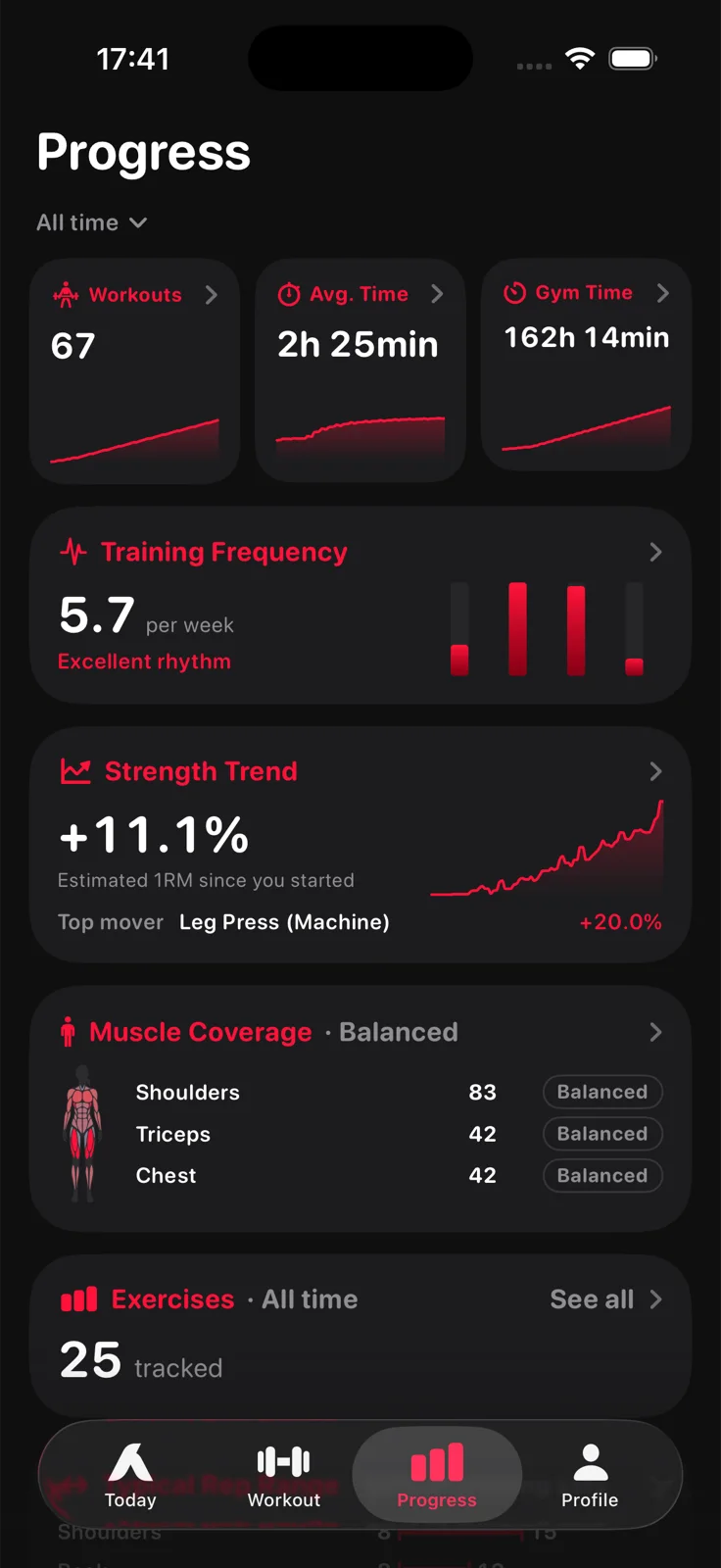
The Progress screen's Strength Trend is the average change in estimated one rep max across your exercises, first session in the window to the latest, with the top mover named. Every exercise has its own chart. If the line is flat, you know; if it climbs, you know that too.

How progress is measured ›
Aveldo Progress screen: workouts, average time and gym time, training frequency per week, a strength trend of +11.1% estimated one rep max with the top mover, muscle coverage and tracked exercises
Who it is for

For lifters who progress by the numbers

Aveldo's overload tracking suits lifters who work in a rep range and add weight when they reach its top, which is how most intermediate and advanced programmes progress. It also suits anyone who simply wants to know whether last week's session was beaten.

It does not write your programme. You decide the exercises, the range and the step; Aveldo remembers, compares and, if you let it, applies the increase.

Frequently asked questions

Does Aveldo track progressive overload?

Yes. Every set line shows last session's weight and reps while you lift, the post workout comparison shows which sets got heavier at comparable reps or gained reps at the same weight, and the Strength Trend and exercise charts show the change over weeks. Aveldo Pro can also apply the weight increase for you.

How does automatic weight increase work in Aveldo?

You set a rep range, for example 6 to 10, and a weight step, for example 2.5 kg. When a set reaches the top of the range, that set comes back one step heavier in the next session, with its rep hint starting again at the bottom of the range. A set that fell short keeps its weight. Reps are never filled in for you. Automatic weight increase is part of Aveldo Pro and can be switched off.

Can I track progressive overload for free in Aveldo?

Yes. Last session's numbers on every line, the post workout comparison, the Strength Trend and the per exercise charts are all free. Automatic weight increases are part of Aveldo Pro.

What is the best way to track progressive overload?

Log every set with its weight and reps, look at the previous session of the same exercise while you lift, and judge progress over weeks, not day to day. A tracker that shows last time's numbers on the set line and estimates strength from weight and reps together, so that a rep gained at the same weight counts, makes this easy to do consistently.

How often should I increase my workout weights?

There is no universal schedule. A common rule is double progression: keep the weight until your sets reach the top of your rep range, then add the smallest step your gym allows and build the reps back up. Aveldo's automatic weight increase applies exactly that rule, per set.
Beat last session.

Aveldo shows you what you lifted last time, on every line, from the first workout you log.

Download on the App Store