Workouts, Avg. Time, Gym Time
Training days in the window, the average duration of a session, and the total time in the gym, each with a small trend and the change against the previous window.
The Progress screen turns the sets you log into a handful of honest numbers: how much you train, whether your strength is improving, which lifts and muscle groups moved, and where your training is concentrated. Every card follows one time window, and every figure is arithmetic on your own log.
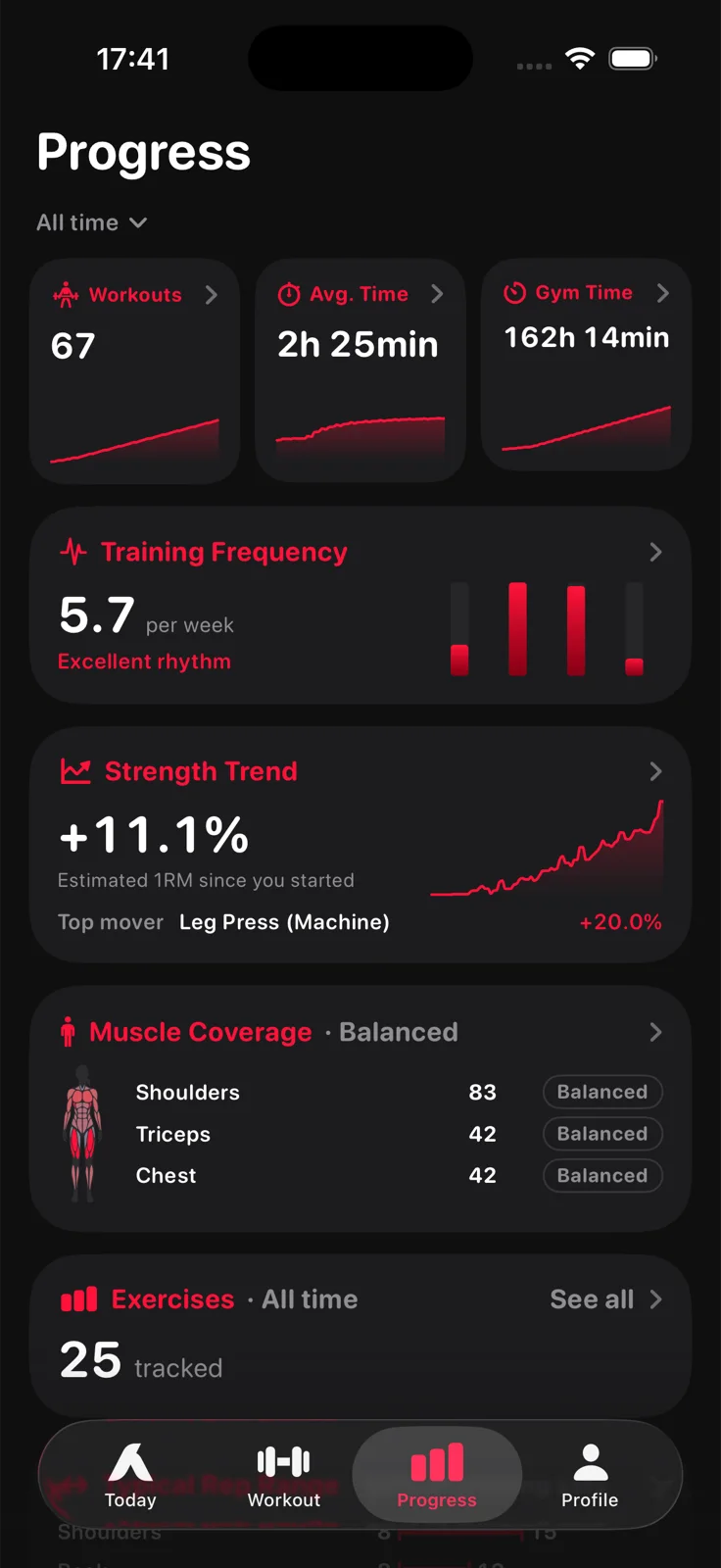
Workouts, average time and gym time; training frequency per week; the Strength Trend based on estimated one rep max with its top mover; muscle coverage; and every exercise you track with its own chart. Aveldo Pro adds the advanced insights below and opens the longer windows.
The cards every install gets, over the last 7, 30 or 90 days.
Training days in the window, the average duration of a session, and the total time in the gym, each with a small trend and the change against the previous window.
Training days per week, drawn against your weekly goal, with a word on the rhythm.
Estimated one rep max, first session in the window to the latest, averaged across exercises, with the top mover. Its detail draws the curve and lists every mover. See the gym progress tracker.
Sets per muscle group over the window, with the body figure beside the rows and a note on balance.
Every exercise you have logged, each with its chart of estimated one rep max or weight, best day and average reps.
The figure, front and back, with the strength change per muscle group. See strength progress per muscle group.
More questions the same log can answer, for the lifter who wants them.
Per muscle group, the narrowest whole number rep interval that holds 90 percent of your working sets in the window, on one shared 1 to 20+ scale.
Your sets folded into six body regions, chest, shoulders, arms, legs, core and back, drawn as a radar against the previous window on one scale.
How much your estimated one rep max varies across your last ten sessions of each exercise, with a word from Very Stable to Very Variable. On the Today screen.
Which weekday and training hour you historically perform best, computed only once enough training days exist and shown with the lift above your baseline. On the Today screen.
A tap on a muscle opens that group's own strength trend; the Strength Trend detail's Routine face shows one routine's sessions alone.
Last 6 months, last year and all time, on every card of the Progress and Body screens.
Workouts, average time and gym time for the window you pick; training frequency per week against your weekly goal; the Strength Trend based on estimated one rep max with the top mover; muscle coverage per muscle group; and the list of exercises you track, each with its own chart. Aveldo Pro adds Typical Rep Range and Muscle Distribution.
Last 7, 30 and 90 days in the free version. Aveldo Pro adds last 6 months, last year and all time. Every card on the Progress screen and the Body screen follows the pick.
Typical Rep Range, the narrowest rep interval holding 90 percent of your working sets per muscle group; Muscle Distribution, your sets by body region against the previous window; Performance Consistency, how much your estimated one rep max varies across your last ten sessions per exercise; Peak Performance, the weekday and hour you historically perform best; a strength trend per muscle group and per routine; and the Body screen's sets face.
Yes. The Workouts card opens a detail with your latest sessions, and every logged workout stays in the app. Exercise charts show each lift's history over the window.

Free on the App Store for iPhone. No account needed to start.
Download on the App Store