One tile per exercise
Sets are lines on the exercise's tile, grouped under the muscle they train. Numbered discs mark the sets you have filled.
Aveldo's workout logging is one tile per exercise and one line per set, with your last session's weight and reps on every line. Type the numbers, the rest timer starts, and the workout joins your history when you finish.
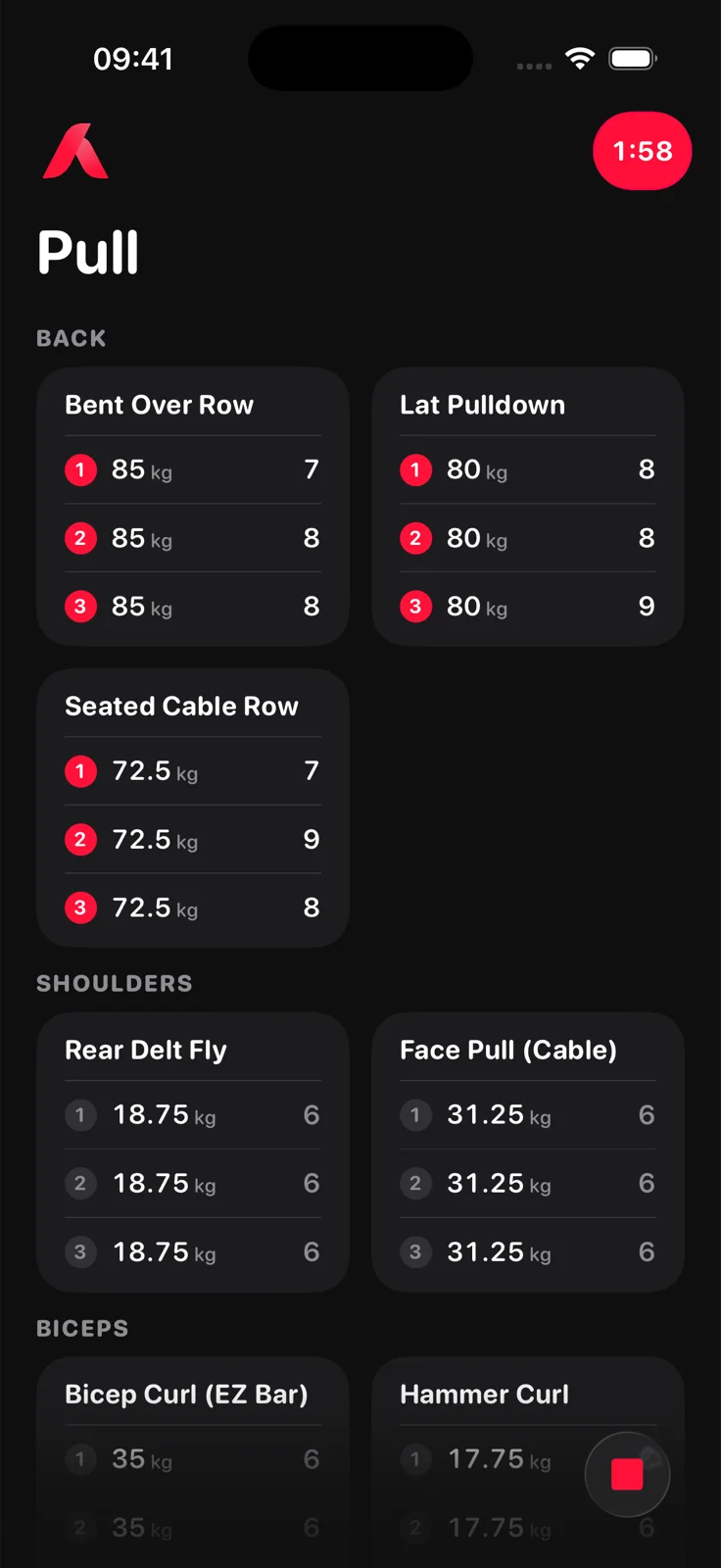
Start a routine, type weight and reps on each set line, and unlock the workout when you are done. Each line already shows what you did last time, the rest timer starts when a set is logged, and the post workout comparison appears when you finish.
Everything a set needs, and nothing that gets in the way of the next one.
Sets are lines on the exercise's tile, grouped under the muscle they train. Numbered discs mark the sets you have filled.
Weight and reps from your last session of the exercise sit on each line as a grey hint. A set with no history hints the bottom of your rep range.
The workout opens locked: the tab bar is gone and only the set lines take input. Tap the close button to unlock and finish.
Pick a movement and its equipment: barbell, dumbbell, cable, machine, Smith machine or bodyweight. Or add your own exercise with its muscle group. See routines.
The first time you add an exercise, Aveldo asks for its starting weight so the lines are prefilled from the first session. You can leave it empty and type on the tile instead.
Deleted workouts, exercises and sets wait in the Tray until you restore them or empty it. A tap never destroys anything.
Choose your unit in setup or later in Personalization. Weight steps are round figures in your unit.
Finish, and the recap compares the workout with the routine's previous session: strength change, top improvements, new bests. See the progressive overload tracker.
Log a set and the timer starts, in the corner and in the Dynamic Island. See the rest timer.
Yes. Pick a bodyweight variant in the library, such as pull ups or push ups, and the exercise logs reps alone with no weight column. Weighted and assisted variants log a weight as usual, and a plank logs its hold.
Yes. Open the workout and change any weight or rep count. The Progress screen recomputes from the log.
Yes. Add a set from the tile's menu or the Edit sheet, and remove one the same way. New sets take the tile's weight and hint the bottom of your rep range.
It goes to the Tray under Profile, together with any deleted exercise or set. Restore it from there, or Restore all. Nothing is destroyed until you empty the Tray yourself.
Yes. Starting a workout begins a gym session, and finishing it ends one. The Progress screen shows your average time and total gym time, and the Today screen shows your last workout's duration.

Free on the App Store for iPhone. No account needed to start.
Download on the App Store